.JPG.jpeg&w=3840&q=75)
Binaya dhakalOctober 13, 2026
Veel Now Integrates Natively with SHOPLINE: Shoppable Video, Catalog Sync, and Affiliate Tracking
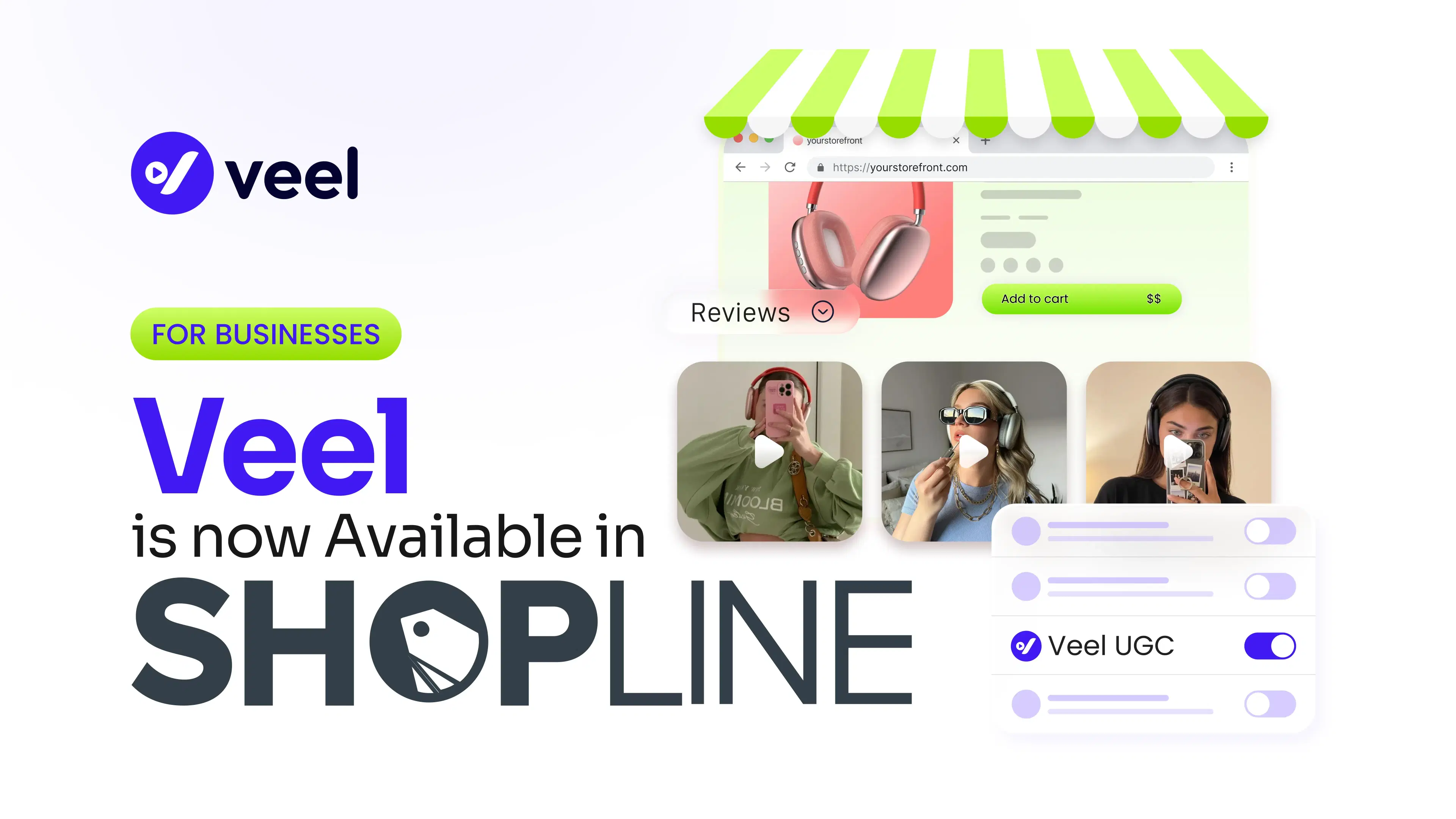
A shopper lands on your product page. The photos are good, the description is accurate, and they still hesitate. They want to see the product on a real person, in a real home, with real lighting. So they open a new tab, search your brand on TikTok, and often never come back.
Most SHOPLINE merchants already have content that would keep that shopper on the page. It sits in customer DMs, creator posts, and review emails. The hard part is getting it onto the product page, keeping it matched to the right product, and knowing which creators actually drove sales.
Veel now has a native SHOPLINE integration, available in the SHOPLINE App Store. It brings shoppable video, product catalog sync, and affiliate tracking to SHOPLINE stores, along with the rest of Veel's creator marketing tools. Here's what each piece does and how setup works.
Key takeaways
- The Veel SHOPLINE integration is live in the SHOPLINE App Store, and the app is free to install.
- It adds a video carousel (UGC Reviews) and a shopper upload block (UGC Uploads) to your product pages.
- You place each block once, and it appears on every product page.
- Catalog sync ties your SHOPLINE products to Veel, so content and campaigns match what you sell.
- Affiliate tracking credits sales to the creators who drove them.
- Content Discovery, Design Studio, Content library, Brand Toolkit, and Creator campaigns come with the setup flow.
What does the Veel SHOPLINE integration do?
Veel's native SHOPLINE integration adds shoppable creator and customer video to your product pages. Install it free from the SHOPLINE App Store, turn on the app embed, and place a video carousel and a shopper upload block once. Catalog sync keeps each video tied to the right product, and affiliate tracking credits sales to creators.
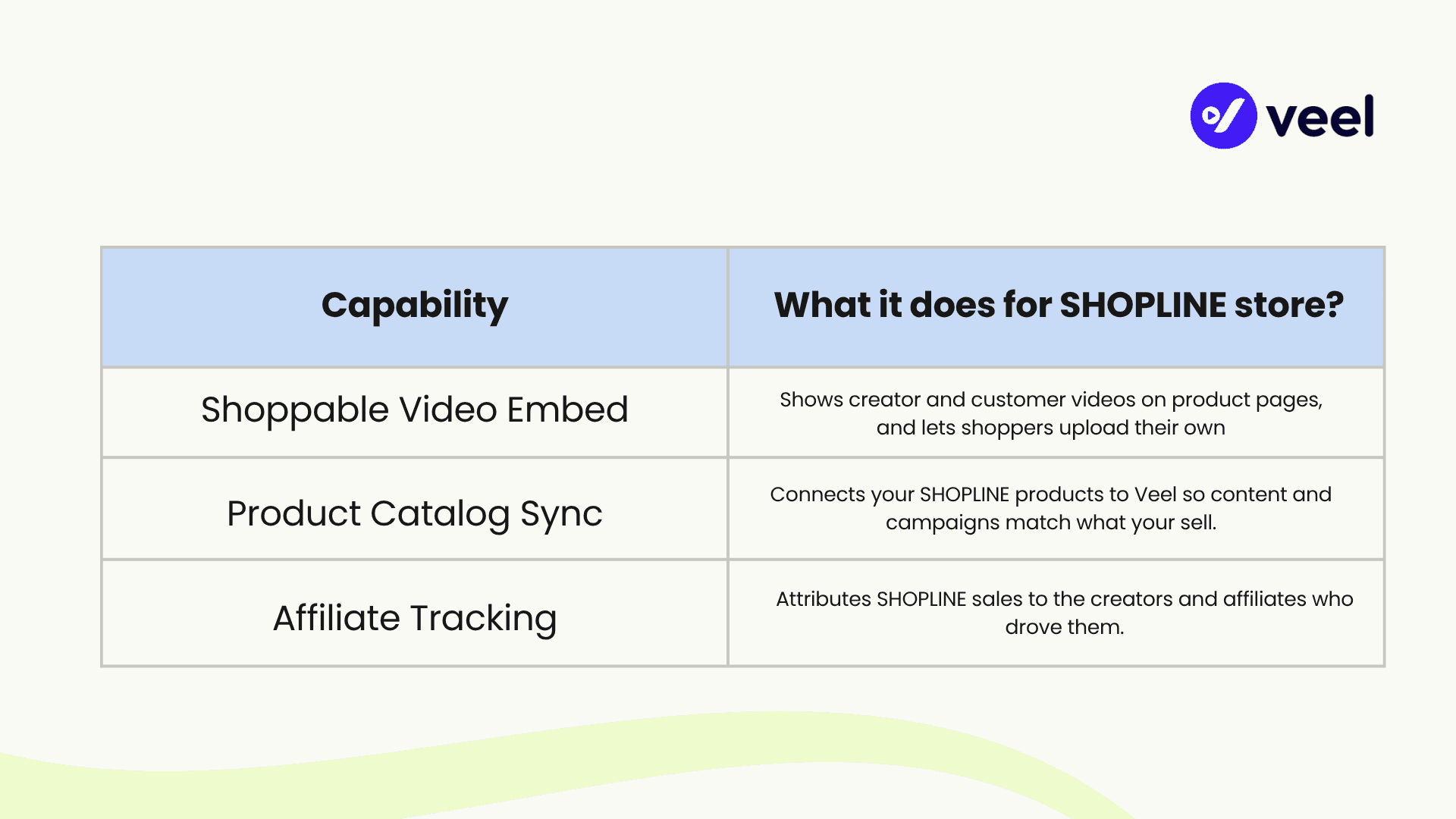
Veel is an AI-powered creator marketing platform. Brands use it to run UGC campaigns, influencer campaigns, and affiliate programs with a network of 550,000+ verified creators across 121+ countries, and more than 450 brands use it today. The SHOPLINE integration connects that platform to your store through three core capabilities:
Why put video on SHOPLINE product pages?
Text reviews tell shoppers that someone liked a product. Video shows them why. A buyer can see how a jacket fits, how large a lamp really is, and how a serum looks on skin after a week. Those are the questions that stall a purchase, and a staged brand photo can't answer them. (Selling skincare? Here's why UGC matters for beauty and skincare brands.)
Video from real people also carries a different kind of trust. But most stores hit the same four walls when they try to put it on their storefront:
- Scattered collection. Reviews arrive by email, creators post on social, and customers send clips through DMs.
- Manual placement. Someone has to download, upload, and match each clip to a product page.
- Unclear content rights. A clip that looks great may not be cleared for your store or your ads.
- Unclear attribution. A creator video might drive sales, but nothing connects the two.
The integration is built to fix all four inside SHOPLINE.
How shoppable video works on SHOPLINE
Veel gives SHOPLINE stores two blocks you can add to product pages.
UGC Reviews is a video carousel. It shows approved customer and creator videos next to the product, where buying decisions happen.
UGC Uploads is a button that lets shoppers submit their own video from your store. Their clips flow into your Veel library for review before anything is published.
Where do the videos come from?
A carousel is only as good as its content, so Veel gives you four ways to fill it:
- Review collection. Request and collect reviews from customers with automated review requests. Our guide to video requests via email campaigns walks through the setup, and UGC Reviews covers the product.
- Shopper uploads. The UGC Uploads block collects video directly on the page.
- Creator campaigns. Brief creators to film content made for your products.
- Content Discovery. Find creator videos that already mention or feature your brand, including content from TikTok, Instagram, and YouTube.
Control what goes live
Nothing has to appear on your store without your approval. Veel includes moderation workflows, so you review and approve submissions before they publish. You can also organize content by product, which keeps each carousel relevant instead of a random mix of clips.
Reuse what you collect
Approved reviews and creator videos can also run in paid ads, email campaigns, and social posts, with usage rights managed in Veel. The clip that builds trust on a product page can do the same job in an ad. For ideas on what to ask creators for, see 15 UGC video examples that feel authentic.
SHOPLINE product catalog sync
Video loses value when it's attached to the wrong product. A great clip of a blue backpack does nothing on the page for the green one. Catalog sync connects your SHOPLINE catalog to Veel so content, reviews, and campaigns stay linked to real products in your store. In practice, that gives you:
- Product-level organization. Videos and reviews are grouped by the products they belong to.
- Campaigns tied to specific items. When you brief creators, you can point them at the exact products you want featured.
- Less manual matching. You aren't re-entering product details or hunting through your library each time the catalog changes.
- A cleaner product page. Each carousel shows content relevant to that product.
Affiliate tracking for SHOPLINE merchants
Creators who drive sales should be paid for the sales they drive. With Veel's affiliate tracking, a SHOPLINE merchant can:
- Give creators a way to promote and be measured. Veel supports affiliate links, including a link per video, so each piece of content is tracked on its own.
- Connect creator activity to revenue. Sales are credited to the creator behind them, so you don't need a separate attribution spreadsheet.
- Share the results. Merchants and creators can both see what a link has produced.
- Pay on performance. Instead of paying only for posts, reward the content that actually sells.
New to affiliate programs? Start with the Veel Affiliate Program.
How to set up Veel on SHOPLINE
Setup takes three steps inside the Veel app, and it needs no code. After you install Veel from the SHOPLINE App Store and connect your store, the app shows your connection status at the top of each screen and walks you through the rest.
Step 1: Turn on the Veel app embed
The app embed loads Veel on your storefront. Until it's on, nothing Veel renders will appear in your store, and the setup flow tells you so.
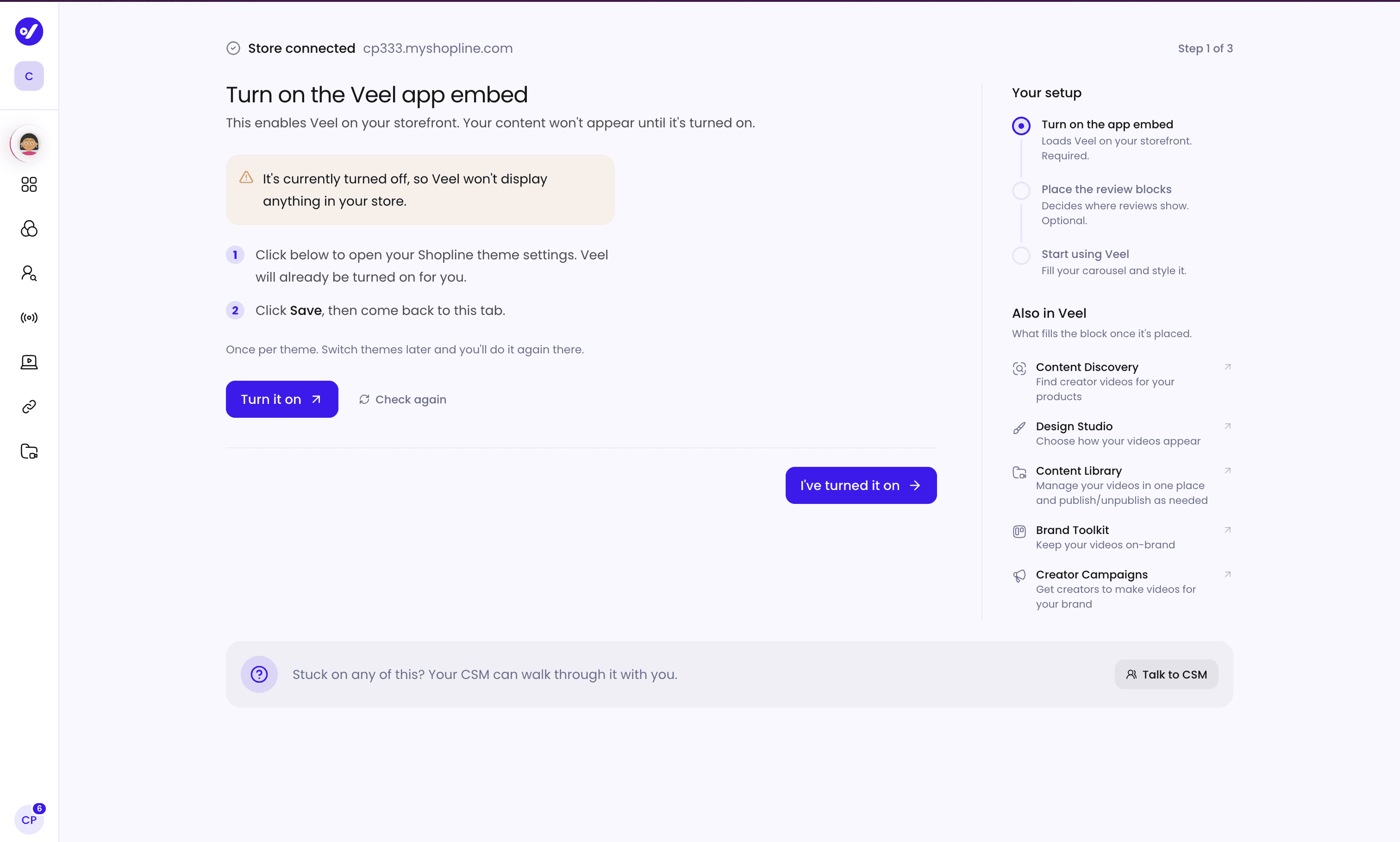
Click Turn it on. Veel opens your SHOPLINE theme editor with Veel UGC already switched on. Hit Save, return to the Veel tab, and click Check again. Veel confirms the embed is active.
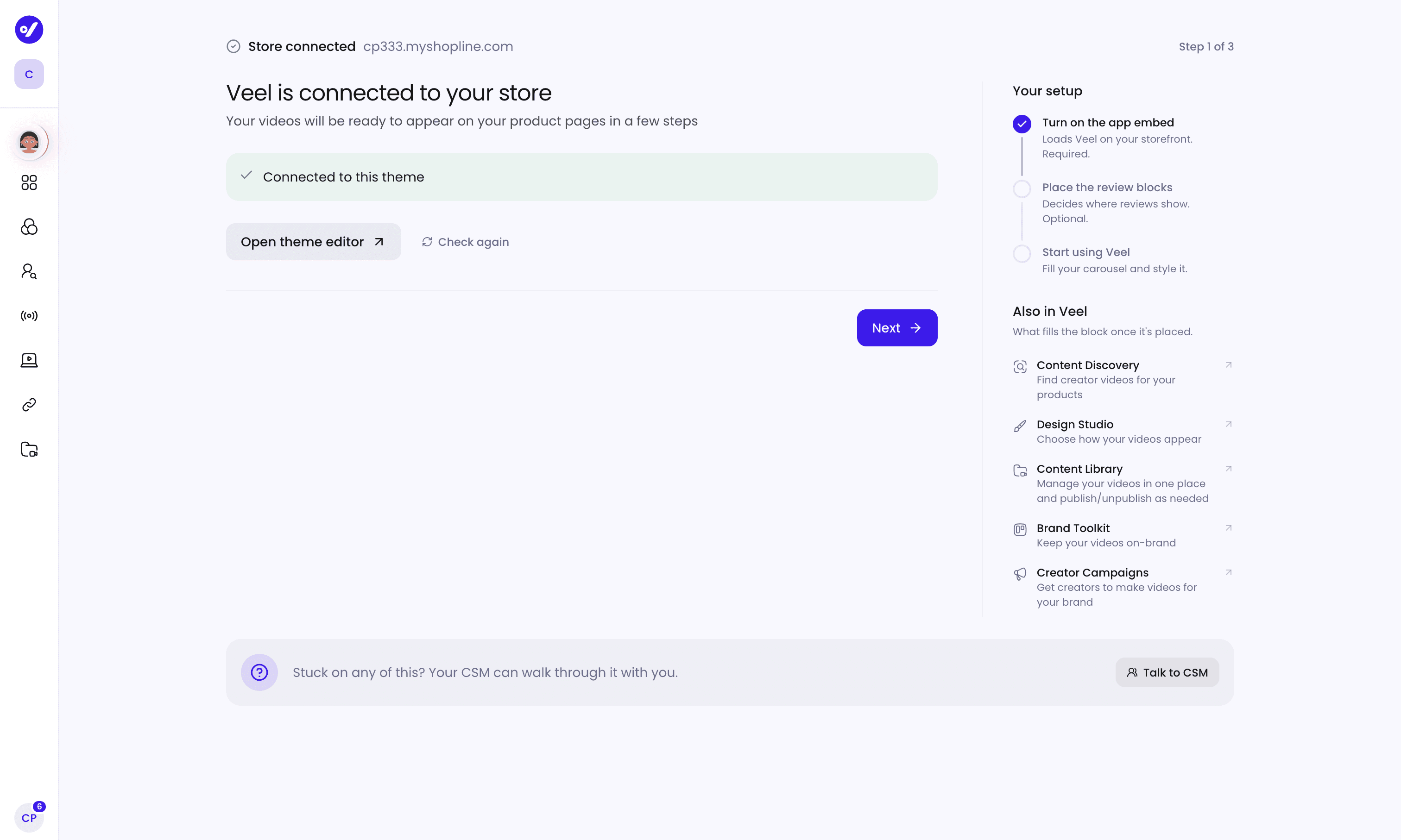
You do this once per theme. If you switch SHOPLINE themes later, repeat it in the new one.
Step 2: Choose where reviews appear
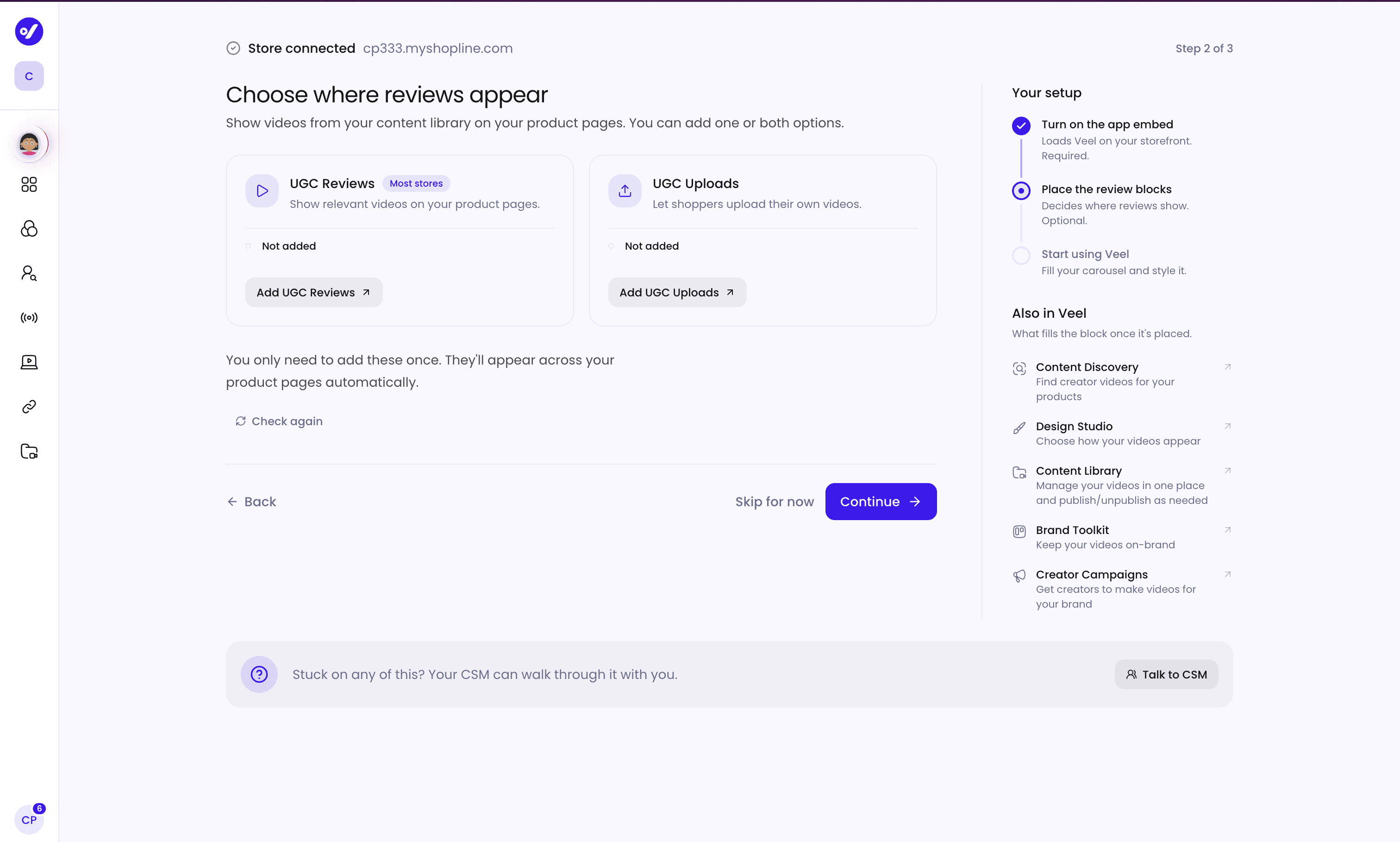
Click Add UGC Reviews to place the video carousel on your product pages. Click Add UGC Uploads if you want shoppers to submit their own videos. Each block is added once and then shows on every product page, not one product at a time.
Step 3: Start using Veel
With the embed on and your blocks placed, your product pages are ready for video.
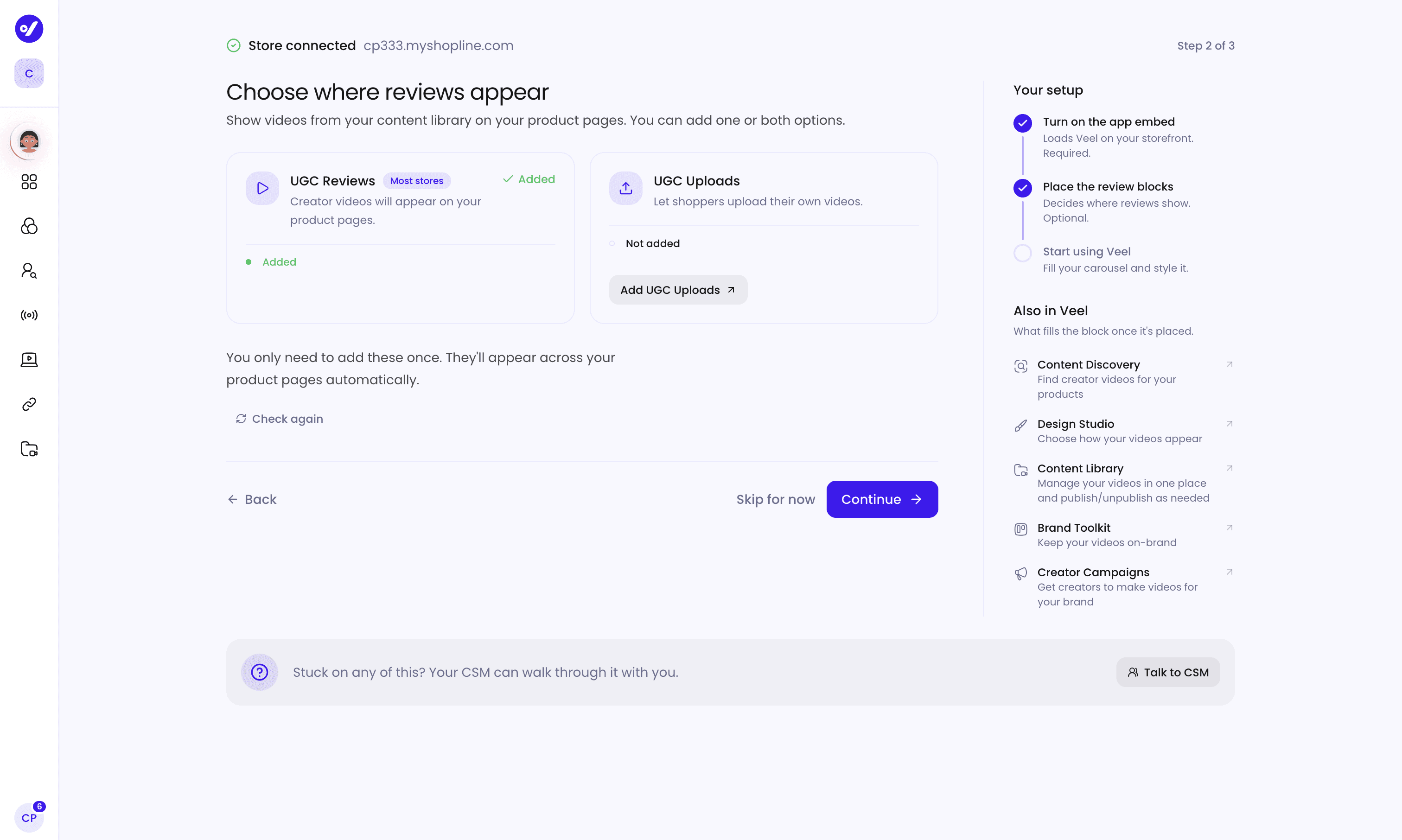
Click Find your first videos to start filling your carousel, or open Store settings to adjust your connection. If you get stuck, the setup flow includes a Talk to CSM option, so your Veel customer success manager can walk through it with you.
The five Veel tools that come with your SHOPLINE setup
The final setup screen lists the tools that turn an empty carousel into a working one.
- Content Discovery helps you find creator videos for your product pages. Instead of a blank carousel, you search existing content that fits your products and add it with the right permissions.
- Design Studio styles the carousel and the upload button so video looks like part of your theme, not a third-party add-on.
- Content library holds every video you own, in folders you control. Organize by product, campaign, or channel, then pull a clip for a page, an ad, or an email.
- Brand Toolkit applies the fonts and colors you set once to both widgets, the carousel and the upload block.
- Creator campaigns let you brief creators to film videos made for your brand. Veel supports UGC campaigns, influencer campaigns, and creator partnerships. You can match with creators from the network of 550,000+, offer free products in exchange for content, manage usage rights, and pay creators in 121+ countries. For a SHOPLINE store, that means you can commission the exact video a product page is missing. Read how to find UGC creators who fit your brand, or request a creator campaign plan and we'll help you scope one. See how Creator Campaigns work in Veel.
Who is the Veel and SHOPLINE integration for?
- DTC and ecommerce brands that want video proof on product pages without custom development.
- Growth and performance marketers who want creator content tied to trackable sales.
- Stores with large catalogs that need a block placed once and shown everywhere.
- Brands new to creators that want to start with customer video and add campaigns later. Our guide to managing UGC video campaigns is a good next read.
Frequently asked questions
Does Veel integrate with SHOPLINE? Yes. Veel offers a native SHOPLINE integration in the SHOPLINE App Store. Connect your store and add creator and customer video directly to your storefront.
Is the Veel SHOPLINE app free? Yes. The app is free to install. Your Veel plan determines the features, storage, playback, and other usage available to your store. See Veel pricing.
How do I add videos to my SHOPLINE product pages? Install Veel from the SHOPLINE App Store, enable the Veel app embed in your theme editor, and add the UGC Reviews block to your product page. Then select videos from your Veel Library to display.
Do I need to set up the video block on every product page? No. Add the UGC Reviews block to your product template once, and it appears across the product pages that use that template.
What happens if I change my SHOPLINE theme? Enable the Veel app embed and add the Veel blocks to the new theme. Your existing content and Veel settings stay in your Veel account.
Can shoppers upload their own videos? Yes. The UGC Uploads block lets shoppers submit photos and videos from your storefront. You review submissions and choose what gets published.
Can I run an affiliate program for my SHOPLINE store? Yes. Veel's affiliate and partnership tools connect creator activity with SHOPLINE sales, so you can see which creators drive purchases and measure their performance.
Can Veel help me find creators? Yes. Content Discovery finds existing creator videos featuring your brand, and Creator campaigns let you brief creators and commission new content for your products.
Can I use creator videos and customer videos together? Yes. Veel brings together creator content, customer submissions, campaign content, and existing videos in your Veel Library. You pick what to display in your UGC Reviews blocks.
What if I don't know how to set up Veel inside SHOPLINE? Use the Talk to CSM option to reach your customer success manager, who can guide you through setup.
Get started with Veel on SHOPLINE
Shoppers want to see your product used by real people before they buy. The Veel SHOPLINE integration helps you collect that video, show it on the page, keep it tied to the right product, and credit the creators who bring in sales.
Install Veel from the SHOPLINE App Store or book a demo to see it on your store.