
Binaya dhakalNovember 10, 2026
UGC Ad Scripts: 15 Templates You Can Copy (with Hook, Body, CTA)
15 UGC Ad Script Templates: Hook, Body and CTA You Can Copy
Most UGC ads don’t fail because of the creator. They fail because nobody gave the creator a plan for what comes after the first line. A strong opening buys you three seconds. The UGC ad script has to carry the viewer through the other twenty-seven.
This post gives you 15 UGC ad script templates, each split into hook, body and CTA, with notes on what to show on screen and which products fit. You’ll also get a timing structure, a fill-in-the-blank master template, a method for adapting any template to your product, and a way to brief creators without making them sound like they’re reading a teleprompter.
If you only need openings, start with our guide to UGC ad hooks, pick one, then come back here to build the full script around it. Need creators to film it? Skip to the section on choosing a UGC platform near the end.
What is a UGC ad script?
A UGC ad script is the outline of a user-generated video ad: a hook that stops the scroll in the first one to three seconds, a body that shows the problem, product and proof, and a call to action that tells the viewer what to do next. The best scripts give creators structure and key points, not word-for-word lines.
If you’re new to the format, our guide to what UGC ads are covers the basics, and 15 UGC video examples shows what authentic looks like on screen.
The anatomy of a UGC ad script
Every template below follows the same skeleton. Here’s what happens when, for a 30-second ad:
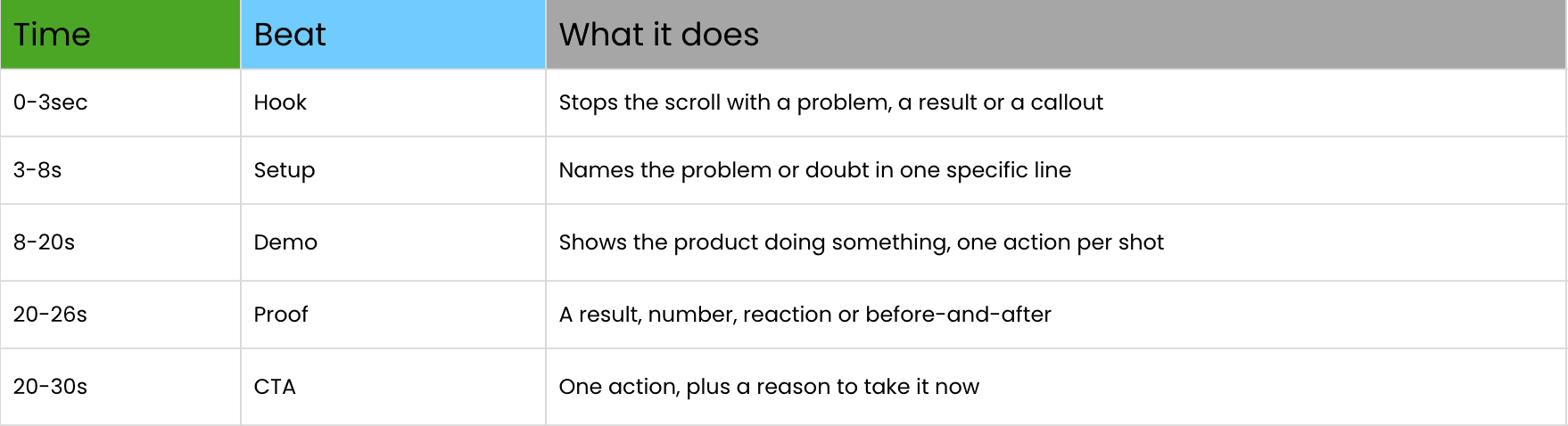
Two things about this structure. First, the hook is the only part that needs to be “clever.” Everything after it should be plain and specific. Second, the demo is the script’s centre of gravity. If the viewer can’t see the product doing something, the rest is just a person talking.
When you write the script for a creator, use four columns: time, spoken line, what’s on camera, and on-screen text. If a spoken line gives the creator nothing to film, rewrite it.
On Facebook, plenty of people watch with the sound off, so every spoken line should also appear as captions or on-screen text. We cover placements and formats in our guide to UGC video ads for Facebook.
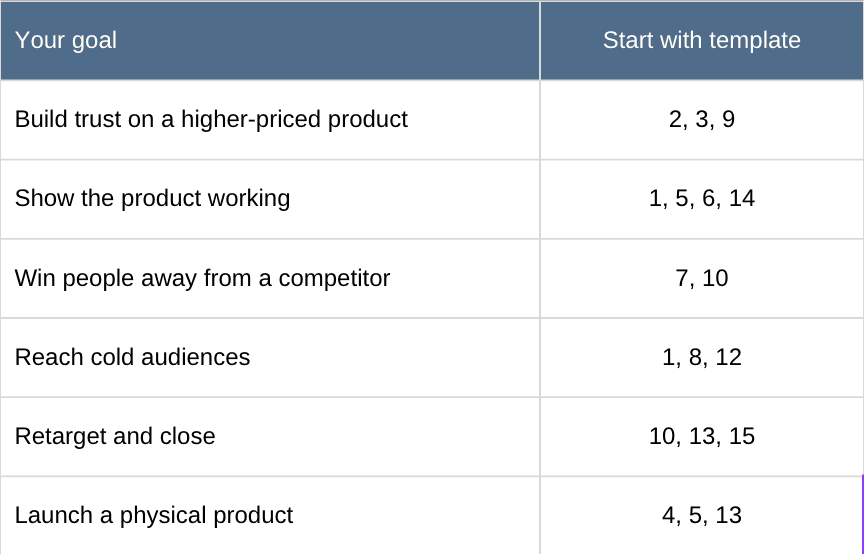
Which UGC script template should you use?
15 UGC ad script templates you can copy
Swap the brackets for your product. And please don’t hand these to a creator as a script to memorize. Hand them the shape and let them say it their way. (More on that in the briefing section below.)
1. Problem → Solution
Hook: “If your [problem] looks like this, watch this.” Body: Show the problem up close. “I tried [failed fix] and nothing changed. Then I found [product]. Here’s what happened after [time period].” Demo the product, then show the result. CTA: “I left the link below. It’s [offer] right now.” Show: The problem in frame one, the result in the last five seconds. Best for: Cleaning, beauty, home and anything with a pain people can see.
2. Honest 30-Day Review
Hook: “I’ve used this for 30 days. Here’s the honest version.” Body: What you expected, what actually happened, one small thing you didn’t love, and who it’s really for. That one small flaw does more for trust than five compliments. CTA: “If you’re [type of person], it’s worth trying. Link’s in the ad.” Show: A used, slightly worn product. Pristine packaging undercuts the “30 days” claim. Best for: Higher-priced items where trust is the sticking point. Pair it with UGC reviews for customer trust on the product page.
3. Skeptic to Believer
Hook: “I rolled my eyes when my sister sent me this.” Body: Why you doubted it, the specific moment you changed your mind, and the result. Name the moment. “Day four, I noticed [thing]” beats “eventually it worked.” CTA: “Don’t wait as long as I did. Link’s below.” Show: A text thread or the product still in its packaging, then real use. Best for: Crowded categories where viewers have been burned before. Only use it if the product holds up, because this hook invites scrutiny. There’s a reason it works, covered in the psychology behind “I trust this video”.
4. Unboxing First Reaction
Hook: “Okay, this just showed up and I have to show you.” Body: Open the package on camera, give honest first impressions (including surprises about size or feel), then try it live. CTA: “If you want one, the link’s right here.” Show: Hands, packaging, the first reaction. Keep the cuts rough. Best for: Physical products, gifts and subscription boxes.
5. Before and After
Hook: [Result shot with text “Day 1 vs. Day 14”] “Look at this first, then I’ll explain.” Body: Walk through the routine in fast cuts, then return to the result so the viewer sees the change twice. CTA: “Here’s exactly what I used. Link below.” Show: Same lighting and angle in both shots, or the comparison looks staged. Best for: Hair, makeup, organizing, cleaning. A word of caution: only show results the product can really deliver. Overpromising here gets ads rejected and refunds requested.
6. Quick Demo
Hook: “Here’s how I use [product] in under a minute.” Body: One action per shot, with a short text label for each. No backstory. The demo is the ad. CTA: “Try it yourself. Link’s below.” Show: Close-ups of hands and the product working. Best for: Tools, kitchen gear, beauty tools and software with a simple flow.
7. The Switch
Hook: “I switched from [Brand] to this and here’s what changed.” Body: Show both products side by side. Say what’s better, and name one thing that’s about the same. That honesty makes the comparison believable. CTA: “If you’re still using [Brand], test this once.” Show: Both products in frame, ideally doing the same job. Best for: Categories with an obvious incumbent.
8. Day in the Life
Hook: “Here’s my morning routine, and the one thing I added.” Body: Film the routine as it really happens. The product shows up around the 8-second mark, used in context, not announced. CTA: “It’s the first thing I’d add. Link below.” Show: Real surroundings, natural light, no styling. Best for: Lifestyle, wellness and fashion.
9. Friend Recommendation
Hook: “My friends keep asking me what I use on [thing].” Body: Where people noticed it, what you use, and how you use it. Keep the visible result in the shot. CTA: “This is the one. Link below.” Show: An ordinary setting with the result visible. Best for: Beauty, hair, fashion and anything others notice on you.
10. Price and Value
Hook: “I stopped paying [amount] for [category] when I found this.” Body: Show what you used to pay, show the replacement, compare results fairly and do the math on screen. CTA: “[Offer] is on right now. Link below.” Show: The receipt, subscription page or the old product in the bin. Best for: Subscription swaps and price-led offers. Use a real number or skip this one. If you’re budgeting for the creator side too, see what UGC creators charge in 2026.
11. Myth-Buster
Hook: “Stop doing [common habit] if you want [result].” Body: Show the habit, explain in one sentence why it fails, then show the fix with the product. CTA: “This is what I use instead. Link below.” Show: The habit, a red X, then the fix. Best for: Education-heavy categories like skincare, supplements and software. Keep the claim specific and honest.
12. Audience Callout
Hook: “If you’re a [dog owner / night-shift nurse / first-time renter], keep watching.” Body: Name two situations that audience deals with, show the product fitting into them, and demo it in their setting, not a studio. CTA: “Made for [audience]. Link below.” Show: The leash, the scrubs, the empty apartment. Something that says “this is for you” before a word is spoken. Best for: Cold traffic. Stick to roles and circumstances, not health conditions or sensitive traits, because Meta restricts ads that imply you know personal attributes about the viewer. Need audiences to call out? The Content Idea Generator maps them for your product.
13. Offer and Promo
Hook: “[Product] is [X% off] until [date], and I’d buy it again at full price.” Body: A fast recap of why you like it, then what the offer includes. CTA: “Deal ends [date]. Link below.” Show: The product in use, with the offer as a text overlay. Best for: Retargeting and launches. Only use a deadline that’s real, or you’ll train your audience to ignore every one. Planning for the holidays? Our BFCM marketing strategy for 2026 covers timing.
14. App or Software Screen Recording
Hook: “I found a way to [task] in [time] without [pain].” Body: Screen-record the two or three taps that matter, with the creator’s face in a corner narrating. End on the finished result. CTA: “Free to try. Link below.” Show: The screen, large and legible on a phone. Zoom into the key tap. Best for: Apps and SaaS, where the product has no physical shape to hold up to the camera. More on that channel in adding creator marketing to your SaaS acquisition mix.
15. Comment Reply
Hook: “Someone asked me if [common question], so here’s the answer.” Body: Show the comment on screen, answer it directly, demo the product, and add a bit of proof. CTA: “Link’s below if you want to try it.” Show: The comment bubble in frame one, then the creator. Best for: Retargeting and objection handling, such as “does it really work on [X]?” Works well across feeds, as we break down in UGC for social media.
A fill-in-the-blank master template
None of the 15 fit? Start here and change one beat at a time.
- Hook (0–3s): “[Audience or result] + one specific line.”
- Setup (3–8s): “I [struggled with / doubted / kept getting asked about] [specific problem or moment].”
- Demo (8–20s): [Action 1], [Action 2], [Action 3]. One shot each, one text label each.
- Proof (20–26s): [Number, reaction, before-and-after or time period.]
- CTA (26–30s): “[One action]. [Offer or reason to act now].”
How to adapt any UGC script template to your product
Templates are a starting point. Here’s how to make one yours in about ten minutes.
Step 1: Name one viewer. Not “everyone who buys [category].” One person, in one moment. “A parent packing lunches at 7 a.m.” gives the script something to aim at.
Step 2: Pick one claim you can show on camera. If you can’t film it, cut it. A script that makes four claims proves none of them.
Step 3: Choose the proof. A result, a number, a reaction, a before-and-after. Pick the one that’s true and visible.
Step 4: Write one CTA with one action. “Tap the link” is an action. “Check it out, follow us and grab the deal” is a mess.
Specific beats clever. “Tired by 3 p.m.” gives the viewer something to recognize. “Struggling with energy” doesn’t. If you’re short on angles, Veel’s free Content Idea Generator maps audiences and use cases for your product. Not sure your store is ready for creator content at all? Run the UGC Readiness Report first.
How long should a UGC ad script be?
Longer isn’t better, but neither is shorter. People speak around 2 to 2.5 words per second. Take out the pauses and demo shots and a 30-second ad holds about 50 to 70 spoken words, while a 15-second ad holds 25 to 35. If your script runs past that, you’re either rushing the creator or planning a video that’s too long.
For cold audiences, 15 to 30 seconds is the usual range. Retargeting can run longer, since those viewers already know you and may need more convincing. Our UGC strategy framework goes deeper on length by funnel stage.
How to brief UGC creators without making them sound scripted
Here’s the mistake we see most: a brand sends a creator a paragraph of finished copy and asks them to “say it naturally.” It never works. Reading sounds like reading.
Give them this instead:
- The template name and the goal. “Skeptic to Believer, 25 seconds.”
- Three to four key points, not sentences. The doubt, the turning moment, the result.
- The first frame. What should be visible before anyone speaks.
- Must-say items. Only legal or factual necessities, like the exact offer.
- Three hook options. Ask them to film the main video once, then record three different openings back to back. This is the cheapest way to get testable variants. See our UGC ad hooks guide for the types to name.
- Usage rights. Confirm paid-ad rights in writing before filming, plus music licensing if audio is involved. Our UGC video content rights guide explains what to ask for.
If the creator needs the physical product, see how Veel Gifting works for sending it. And if you already have influencer footage on a drive, you can turn influencer content into UGC ads by writing new scripts around clips you own.
Where to get these scripts filmed: choosing a UGC platform
A script is only as good as the person filming it. A UGC platform is the software that connects you with creators, collects the videos, handles usage rights and pays everyone. You can do all of that by DM and spreadsheet, but it gets slow past the first few creators.
When you compare platforms, check five things:
- Creator pool in your niche. Veel has 550K+ verified creators, and AI matching surfaces them by niche, budget and performance.
- Speed. First content typically lands in 24 to 48 hours.
- Usage rights. Look for paid-ad rights, music included, from day one.
- Authenticity. Veel’s AI Lens checks content authenticity so you know it’s real user-generated content, not AI-generated.
- Payouts. Creators are paid in local currency across 121+ countries, with tax flows handled.
You set the brief on Veel and AI matching does the rest. You can start a creator campaign, check market rates with the Creator Pricing tool, get a quick read on a creator’s audience and fit with Creator Analysis, or request a creator campaign plan if you’d rather have help scoping it. Free to start; plans are on the pricing page.
Comparing options? See the UGC platform comparison for 2026, our complete guide to UGC video platforms, and the best ways to find UGC creators.
Different teams use it differently. Ecommerce and DTC brands put winning videos on product pages with UGC reviews. Small businesses use local creators. Performance marketers give every video an affiliate link to track revenue by creator. Agencies run multiple clients from one workspace.
How to test your UGC ad scripts
Don’t test five completely different videos. You’ll learn very little about why one won.
- Lock the body. Same creator, same demo, same CTA.
- Change one element at a time. Start with the hook, then test the CTA, then test the template itself.
- Run variants together. Same audience, same budget, same placements.
- Read hook rate and completion rate first. Our strategy framework uses 30%+ hook rate and 40%+ completion rate as working targets. Treat those as starting points and build your own benchmarks from your account.
- Confirm with cost per result. A script that holds attention but doesn’t convert isn’t a winner.
- Rotate often. UGC fatigues faster than polished creative, so plan new openings every one to two weeks on active campaigns.
Once you have a pile of clips and variants, organization matters. Veel’s Content Library stores them by campaign, and approved content can auto-post across Meta, TikTok and YouTube. For a look at what formats hold up in practice, see these UGC ad examples for SMBs.
Common UGC ad script mistakes
- Writing a paragraph, not a plan. Word-for-word scripts produce stiff videos. Give structure and let the creator find the phrasing.
- Stacking claims. One ad, one promise. If the script lists five benefits, the viewer remembers none.
- No demo. A creator talking about a product is a testimonial at best. A creator using it is an ad that works.
- A hook with no payoff. Curiosity and result-first openings only work if the next ten seconds deliver.
- A vague CTA. “Check it out” tells nobody what to do. “Tap the link to get [offer]” does.
- Ignoring sound-off. If the script only works as audio, mute viewers get a person’s mouth moving. Add captions from the first second.
- Forgetting the landing page. The script promises one thing, the page shows another, and the sale dies after the click. We cover the handoff in the social-to-sale gap.
- Skipping substantiation. If a script makes a result claim, make sure you can back it up. Ad platforms, and your customers, will ask.
UGC ad script FAQs
What is a UGC ad script?
A UGC ad script is the outline of a user-generated video ad, usually covering the hook, the body (problem, product and proof) and the call to action. It’s a guide for the creator, not a teleprompter.
How long should a UGC ad script be?
For a 15-second ad, aim for about 25 to 35 spoken words. For 30 seconds, about 50 to 70. That leaves room for demo shots and pauses. Retargeting ads can run longer.
What’s the best structure for a UGC ad script?
Hook, setup, product demo, proof, then CTA. Put the demo at the centre and keep the hook and CTA short.
Should I write UGC scripts word for word?
Usually not. Give creators the key points and the first frame, then let them use their own words. Reserve exact wording for legally required lines or specific offers.
How many UGC scripts should I test at once?
Start with three to five variants. Change one element, usually the hook, and keep the rest identical so you can tell what moved the numbers.
Can I use AI to write UGC ad scripts?
Yes, as a starting point. Use it to generate angles and drafts, then have a real creator rewrite the lines in their own voice.
What is a UGC platform?
A UGC platform is software that helps brands find creators, brief them, collect finished videos, secure usage rights and pay creators in one place. Many also store and distribute the content afterwards.
Where can I find creators to film my UGC scripts?
Use a UGC platform that matches creators by niche and budget, confirms paid-ad usage rights and handles payment. On Veel, AI matching surfaces creators from 550K+ verified creators, and first content typically arrives in 24 to 48 hours.
Turn a script into a live ad
Pick a template, brief a creator and get your first video back in a day or two. Start your first UGC campaign on Veel or see pricing.